Issues with deleting Container App Environments
This blog post covers two typical reasons why deleting a Container App Environment may fail
Overview
There are times that a Container App Environment may fail to delete. Although this is rare. Potential symptons of this after invoking a delete command (via portal, CLI, or else) may show something like the below:
- Fail fast, it may fail after a few seconds with an error about a failure to delete
- Timeout - the command/action may run for tens-of-minutes or more, also ending with a message about failure to delete
At this time of this post (02/16/2026) the direct root cause reason isn’t surfaced back. But we can infer two general reasons for why this may happen:
- Resource locks - This is especially common with environments that use a VNET and a lock is placed on the VNET infrastructure / managed-resource group. But this can happen on environments that don’t have a VNET.
- Unhealthy environment/cluster: A cluster that is in a failed state may cause delete (or in general, create/update/delete options from succeeding). This has it’s own potential causes too.
Resource locks
Resource locks on any of the following (but not limited to) would cause this failure to delete:
- On the Container App Environment
- Potentially on any resources inside of it, such as an a Container App
- On the managed resource group that’s created as part of the environment when a custom VNET is used at creation time
- This resource group gets deleted when the environment gets deleted - so if there is a lock on this resource group or anything in this resource group (eg. Azure Load Balancer, public IP, etc.), then the deletion operation will fail since it cannot fully clean up all resources
These resource groups will look like the following (unless it was customized at creation time):
MC_some-env-name-rg_region(MC_prefixed is used for Consumption-only environments)ME_some-env-name-rg_region(ME_prefixed is used for Workload profile environments)
A quick way to see these resource groups is to go to the Subscription -> Resource groups blade in the Azure Portal.
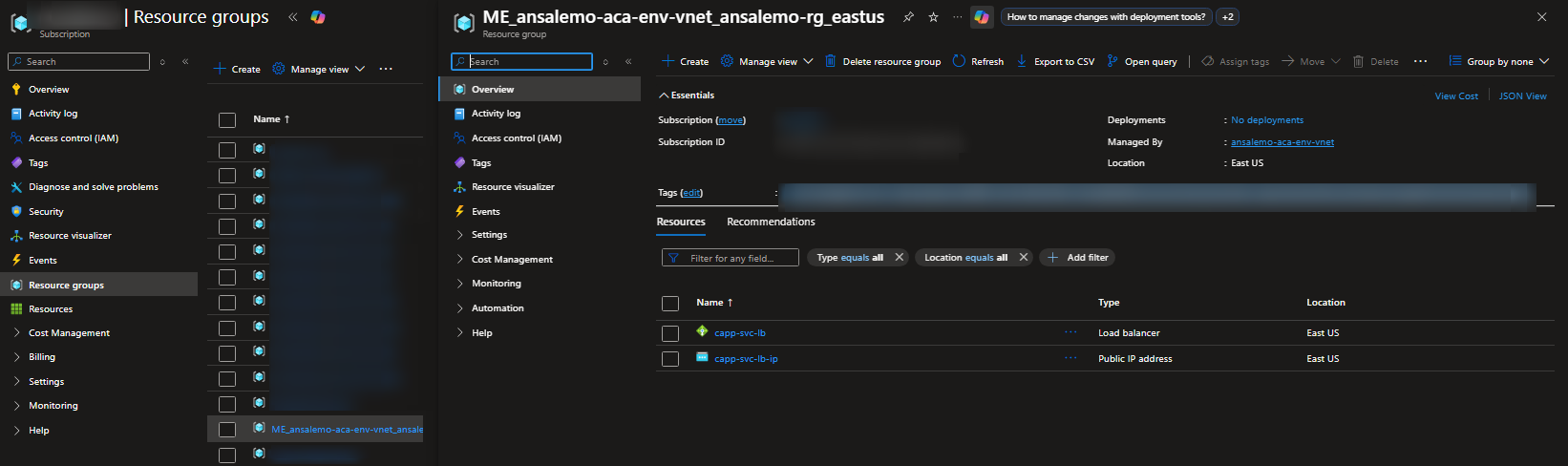
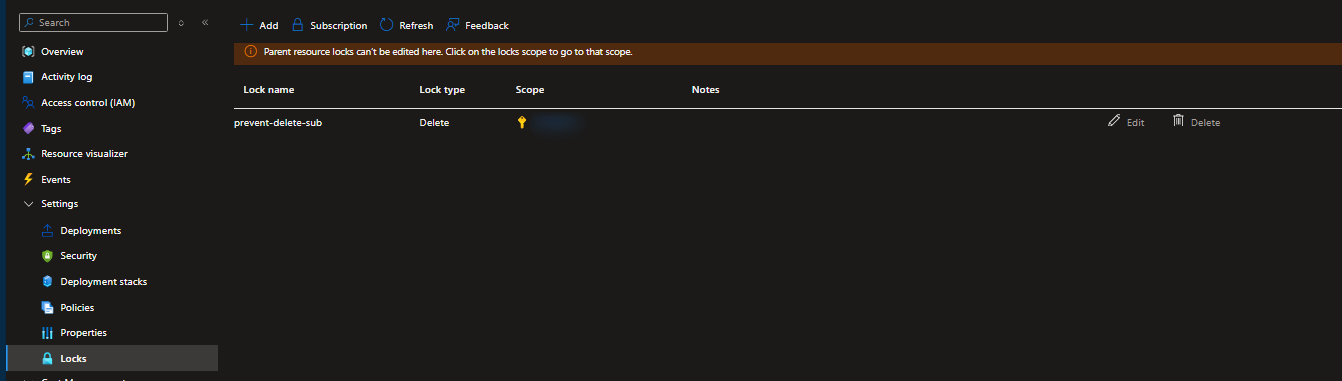
Under Settings -> Locks, you can check if a lock is in place. By default, the Container Apps platform does not add locks.
NOTE: In real-world scenarios, this is likely added by deployment automation in companies/organizations/teams, etc. This automation may also be wide-spread to various resources, and may/may not also be tied to an Azure Policy.
If a user-created lock exists for any resource, you’ll see it in that blade. Below, we can see a lock named prevent-delete was added to this managed resource group.
In our case, a lock was created at the subscription level, which cascades to resources within it.
Now when you try to delete it, you’ll see a popup after a few minutes in the top left of the Azure Portal (or returned through your deployment client) with something like the following:
[resource_name]: The scope '/subscriptions/xxxxxxxx-xxxx-xxxx-xxxx-xxxxxxxxxxxx/resourcegroups/some-rg/providers/Microsoft.App/managedEnvironments/some-env' cannot perform delete operation because following scope(s) are locked: '/subscriptions/xxxxxxxx-xxxx-xxxx-xxxx-xxxxxxxxxxxx'. Please remove the lock and try again. (Code: ScopeLocked)
The important part of this error is because following scope(s) are locked: '/subscriptions/xxxxxxxx-xxxx-xxxx-xxxx-xxxxxxxxxxxx' - since this tells you what scope the lock is for. In our case, it’s a subscription level lock. If it was a resource group lock, it woud look something like /subscriptions/xxxxxxxx-xxxx-xxxx-xxxx-xxxxxxxxxxxx/resourcegroups/some-rg. If it was an individual resource lock, it would target the resource directly. Use this to then go to the Locks blade on the relevant resource, remove it - and then try the delete operation again.
More information on locks, including finding locks in ways not described above, review Azure Resource Locks.
Unhealthy environment/cluster
This can be more tricky to troubleshoot - you can get an indication something may be wrong with the environment/cluster state by the type of error returned during CRUD operations - as it may report back a message stating something like managedEnvironment provisioning state is failed. Use the below guidance to understand if this is related to deletion failures.
You can see this in a more clear way by going to Diagnose and Solve Problems -> Container App Down and look for the following:
powerState- Cluster power stateenvironmentProvisioningState- Container App Environment provisioning statemanagedEnvironmentProvisioningState- Managed environment provisioning state
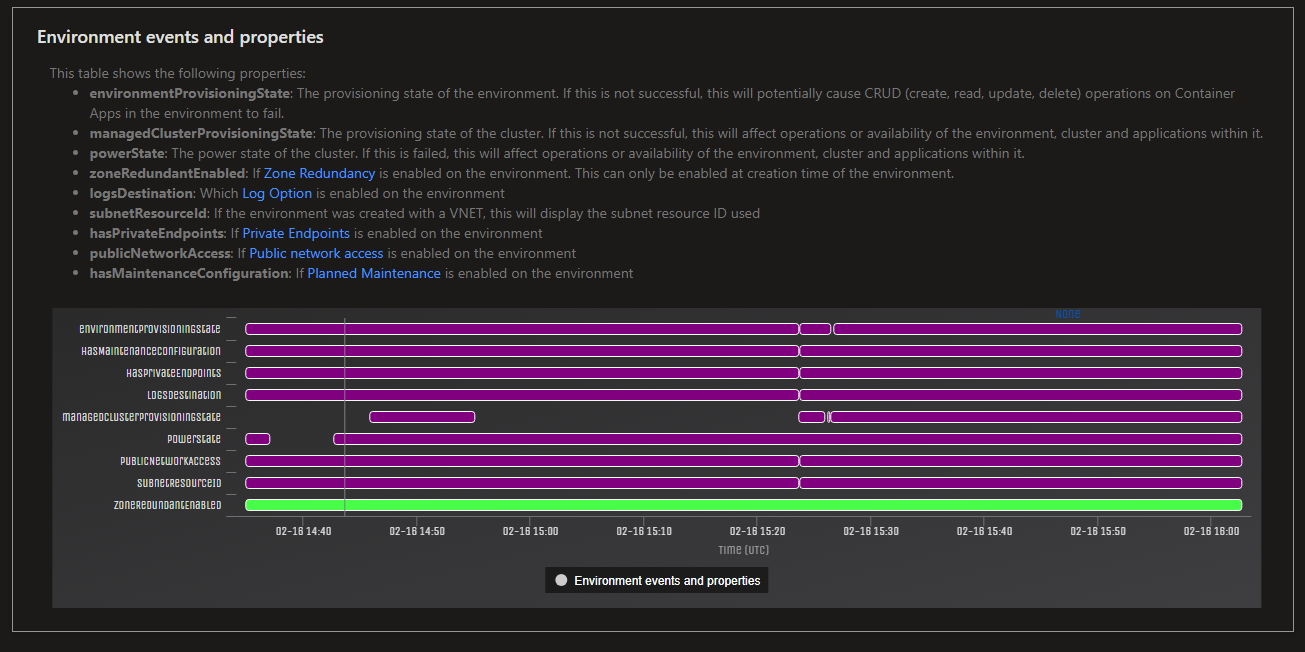
The below is a non-exhaustive list for reasons why environment/cluster states may be unhealthy
If powerState is failed, then create/update/delete operations will likely not succeed.
If environmentProvisioningState not “Succeeded”, this doesn’t immediately mean a deletion or other operations will fail. Take into account the below:
- If
environmentProvisioningStateis shown as “Updating” for multiple hours, then this means this is not a “terminal” state, so create/update/deletion operations will potentially fail. TheenvironmentProvisioningStateshould be at a terminal state, which essentially not “Updating” - if it reaches most other states, you should still be able to delete itenvironmentProvisioningStatebeing unhealthy could be due to a previous delete failure due to resource locks- This could also mean that the environment was attempted to be upgraded through typical Platform Upgrades at a prior point in time but you have an Azure Policy preventing updates. See this documentation on policies with Azure Container Apps for more information
managedEnvironmentProvisioningState may be unhealthy for a few reasons:
- Initial failure upon deployment. This again could be Azure Policy related. Eg. creating a resource without meeting certain policy demands could cause deployments to fail as only a subset of resources failed. Policy errors, like above, may not be returned to the user. You’d have to investigate what policies are set for these resources that are being created within this subscription
- This could also fail due to Platform Upgrades being blocked due to the above
- This could fail due to unhealthy infrastructure
TIP: If the suspected issue was due to an Azure Policy in please blocking upgrades or preventing resource changes - and you have not seen
environmentProvisioningStateormanagedEnvironmentProvisioningStatemove to a succeeded state, then add OR update a tag on the Container App Environment to reconcile the cluster
NOTE: For Consumption-only environments - these are much more sensitive to customer-brought networking, especially for UDR’s and NAT gateways. Blocking any part of underlying AKS traffic (eg. kubeapi-server) will cause the cluster to enter a failed state. Which in turn would cause the above provisioning states to be failed, and your create/update/delete operations to fail.
- This is called out in Securing a virtual network in Azure Container Apps, through Required outbound network rules and FQDNs for AKS clusters. The fact UDR’s are only supported on Workload Profiles are also mentioned here. This also applies to NAT gateways. The short of it is, avoid using this - or send all traffic to the internet through a route, to avoid breaking the environment.
- Ideally, it is heavily recommended to migrate to and use workload profile environments which support this as a feature.