Capacity Planning with Azure Container Apps Workload Profiles : Per-Node, Per-Replica and Practical Sizing
Overview
Azure Container Apps (ACA) simplifies container orchestration, but capacity planning often confuses developers. Questions like “How do replicas consume node resources?”, “When does ACA add nodes?”, and “How should I model limits and requests?”. This guide pairs official ACA guidance with practical examples to demystify workload profiles, autoscaling, and resource modelling.
Understanding Workload Profiles in Azure Container Apps
ACA offers three profile types:
Consumption
- Scales to zero
- Platform decides node size
- Billing per replica execution time
Dedicated
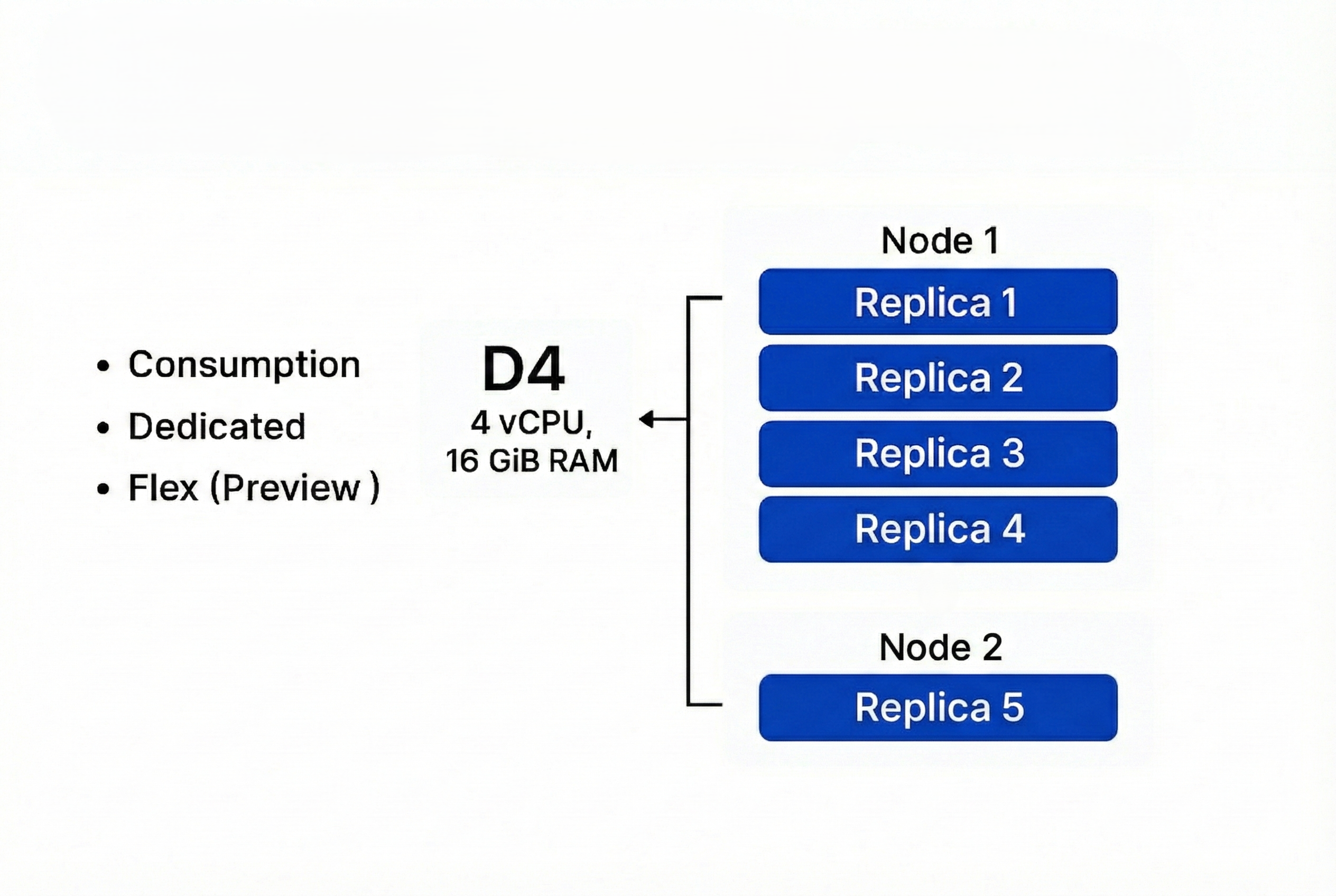
- Choose VM SKU (e.g., D4 → 4 vCPU, 16 GiB RAM)
- Billing per node
Flex (Preview)
- Combines dedicated isolation with consumption-like billing
Each profile defines node-level resources. For Example: D4 → 4 vCPU, 16 GiB RAM per node.
2. How Replicas Consume Node Resources
ACA runs on managed Kubernetes.
- Node = VM with fixed resources
- Replica = Pod scheduled on a node
- Replicas share node resources; ACA packs replicas until node capacity is full.
Example
Node: D4 (4 vCPU, 16 GiB RAM)
Replica requests: 1 vCPU, 2 GiB
5 replicas → Needs 5 vCPU, 10 GiB
ACA places 4 replicas on Node 1 and adds Node 2 for replica 5
3. When ACA Adds Nodes
ACA adds nodes when:
- Pending replicas cannot fit on existing nodes
- Resource requests exceed available capacity
ACA uses Kubernetes scheduling principles. Nodes scale out when pods are not schedulable due to CPU/memory constrains.
4. Practical Sizing Strategy
- Identify peak load → translate to CPU/memory per replica
- Choose workload profile SKU (e.g., D4)
- Calculate packing: node capacity ÷ replica request = max replica node
- Add buffer ( e.g 20% ) for headroom
- Configure autoscaling:
- Min replicas for HA.
- Max replicas for burst.
- Min/Max nodes for cost control.
5. Common Misconceptions
Myth: “Replicas have dedicated CPU/RAM per container automatically.” Reality: Not exactly.They consume from the node pool based on your configured CPU & memory. Multiple replicas compete for the same node until capacity is exhausted.
Myth: “ACA node scaling is CPU-time based.” Reality: ACA node scaling is driven by unschedulable replicas (cannot place due to configured resources). Triggers for replica scaling are KEDA rules (HTTP, queue, CPU/memory %, etc.), but node scale follows from replica placement pressure.
6. Key Takeaways
- Model per-node packing before setting replica counts
- Plan for zero-downtime upgrades (double replicas temporarily)
- Monitor autoscaling behavior; defaults may not fit every workload