Self-Hosted GitHub Actions Runners on Azure Container Apps: Rate Limits, Authentication, and Scaling
Azure Container Apps (ACA) Jobs are a good way to run self-hosted GitHub Actions runners that spin up on demand and scale to zero when idle. However, GitHub API imposes rate limits which can sometimes limit job executions. This post walks through various ways to handle rate limits as well as some related concepts. For more information on ACA Jobs, see the ACA Jobs overview. Additional information is also available at azureossd. Use search terms “jobs” or “keda” to find relevant articles.
TL;DR
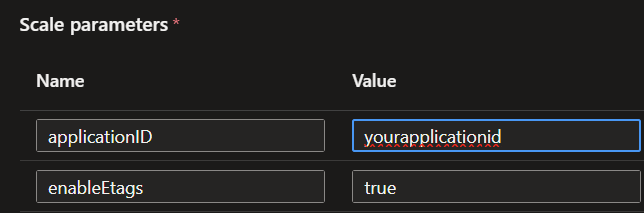
Enable eTags in your ACA keda scaler configuration parameters if this hasn’t been done. This is the quickest and the easiest solution and resolves the issue in most cases. This can be done from the portal settings blade.
Settings -> Event-driven-scaling -> runner -> scale parameters. Below is an example.
Overview
At a high level, when your Github workflow is triggered (code push, manual workflow dispatch etc), a job is queued waiting on execution. There are two separate components on the ACA platform side that are immediately relevant, and both of them talk to GitHub.
- KEDA scaler: It lives inside the ACA platform. This component polls the GitHub API to check if there are any jobs waiting and to decide whether to start a runner.
- ACA Job container: Once a pending job is detected, the ACA job container initializes, registers itself with GitHub API as an agent, picks up and executes a job, runs your workflow and then exits.
Both components call Github APIs. Keda scaler polls frequently and the triggered ACA job authenticates during initialization and all of these calls count towards the available rate limits. If the authentication is with a PAT token which is scoped to an individual user account, other REST API calls made with that same token (for example the GitHub CLI or automation scripts that call the API) also count towards this rate limit. More information is available in the GitHub REST API rate limits documentation.
While Keda polling implementation is abstracted on the platform, the ACA job needs some configuration including the startup script and if needed, the container image.
What Is In the Container Image
The official GitHub runner image is available at ghcr.io/actions/actions-runner, built from the actions/runner repository. This already contains the runner agent and two needed scripts, config.sh and run.sh. We add an entrypoint/startup script that runs when the container boots.
- config.sh: registers the machine as a runner. Needs the repo URL and Registration token.
- run.sh starts the runner.
Entrypoint/startup script
The registration token that config.sh needs is short lived, about an hour. In the entrypoint script, we use a long lived credential (a PAT, or a GitHub App key) to get a short lived registration token which we use to invoke the config.sh script used for registering the ACA job as a GH runner. Following this, we launch the run.sh script which executes the pending job. More information on registering and running self-hosted runners is available in the GitHub self-hosted runners documentation.
Rate Limits and Authentication types
The rate limits are imposed by Github API services. We will go over two common Authentication types, PAT and GH App/GH Enterprise App.
Personal Access (PAT) token authentication
A PAT credential is a single long lived string. Both ACA components use it directly. KEDA sends it to read the queue, and the container sends it to fetch a registration token.
- A PAT gets 5000 requests/hour, but the budget belongs to the user account. Every PAT you create from the same account draws from the same 5000 requests/hour pool.
- A GitHub App installation gets its own separate pool, still 5000 requests/hour but there are some additional limits allowed. A GitHub Enterprise app however has a limit of 15,000 requests/hour.
Github side Configuration
Create a fine-grained PAT under your account at Settings -> Developer Settings -> Personal Access Tokens -> fine grained tokens. Scope it to the repositories you want and grant three permissions:
- Actions: Read only
- Administration: Read and write
- Metadata: Read only
- Ensure the rest are set to No Access.
ACA Side Configuration
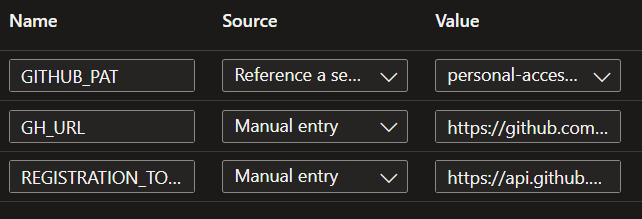
The ACA container configuration includes environment variables for PAT, GH url and registration token url. These can be set on the portal from the Containers blade. Containers -> your container -> Environment variables. Below is an example.
Click on Event-driven scaling -> runner to edit the keda scaler parameters. Below is an example.
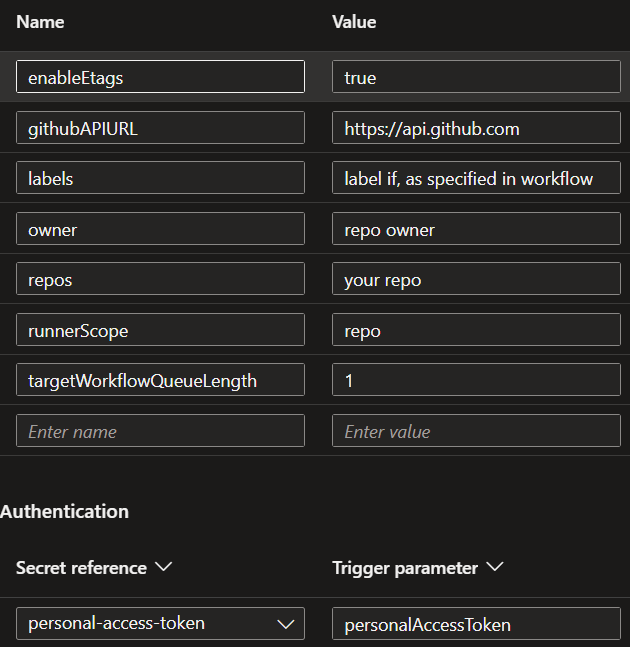
Below is an example with the CLI. Note that if you update an existing job the scale rule is recreated during an update. So ensure you provide all the parameters with each update.
az containerapp job create \
  --name "acaname" \
  --resource-group "your-rg" --environment "your-env" \
  --trigger-type Event \
  --replica-timeout 1800 --replica-retry-limit 0 \
  --replica-completion-count 1 --parallelism 1 \
  --min-executions 0 --max-executions 10 --polling-interval 30 \
  --image "youracrregistry.azurecr.io/github-runner:1.0" \
  --cpu 1.0 --memory 2Gi \
  --scale-rule-name "github-runner" \
  --scale-rule-type "github-runner" \
  --scale-rule-metadata \
      "githubApiURL=https://api.github.com" \
      "owner=your-org" "runnerScope=repo" "repos=my-repo" \
      "targetWorkflowQueueLength=1" "enableEtags=true" \
  --scale-rule-auth "personalAccessToken=personal-access-token" \
  --secrets "personal-access-token=$GITHUB_PAT" \
  --env-vars \
      "GITHUB_PAT=secretref:personal-access-token" \
      "GH_URL=https://github.com/your-org/your-repo" \
      "REGISTRATION_TOKEN_API_URL=https://api.github.com/repos/your-org/your-repo/actions/runners/registration-token"
The Entrypoint script for PAT Auth
The entrypoint script trades the PAT for a registration token, registers as an ephemeral runner, and starts. You can find the full script here.
#!/usr/bin/env bash
set -euo pipefail

: "${GITHUB_PAT:?GITHUB_PAT is required}"
: "${GH_URL:?GH_URL is required}"
: "${REGISTRATION_TOKEN_API_URL:?REGISTRATION_TOKEN_API_URL is required}"

RUNNER_LABELS="${RUNNER_LABELS:-self-hosted,linux}"
RUNNER_NAME="${RUNNER_NAME:-aca-runner-$(hostname)}"

echo "Requesting a runner registration token..."
REGISTRATION_TOKEN="$(curl -fsSL -X POST \
  -H "Authorization: Bearer ${GITHUB_PAT}" \
  -H "Accept: application/vnd.github+json" \
  -H "X-GitHub-Api-Version: 2022-11-28" \
  "${REGISTRATION_TOKEN_API_URL}" | jq -r '.token')"

if [ -z "${REGISTRATION_TOKEN}" ] || [ "${REGISTRATION_TOKEN}" = "null" ]; then
  echo "ERROR: failed to obtain a registration token." >&2
  exit 1
fi

echo "Registering ephemeral runner '${RUNNER_NAME}'..."
./config.sh --url "${GH_URL}" --token "${REGISTRATION_TOKEN}" \
  --name "${RUNNER_NAME}" --labels "${RUNNER_LABELS}" \
  --unattended --ephemeral --replace

echo "Starting the runner..."
exec ./run.sh
GitHub App Authentication
When a user account budget hits rate limits, a Github app may be a better option with increased limits, particularly with the Github Enterperise app.
Github side Configuration
Create a GH app under your account at Settings -> Developer Settings -> Github Apps -> New github app. Provide any url (Ex: your repo url) for the Homepage URL field. Leave most of the other fields blank or as defaults. Scope it to the repositories you want and grant three permissions:
- Actions: Read only
- Administration: Read and write
- Metadata: Read only
- Ensure the rest are set to No Access
Uncheck Webhook “Active” if selected. In the last step, select the app type accordingly. You can select Only on this account which would be scoped to your account if the Enterprise app is not an option.
In the next screen, scroll to the bottom to generate a private key.
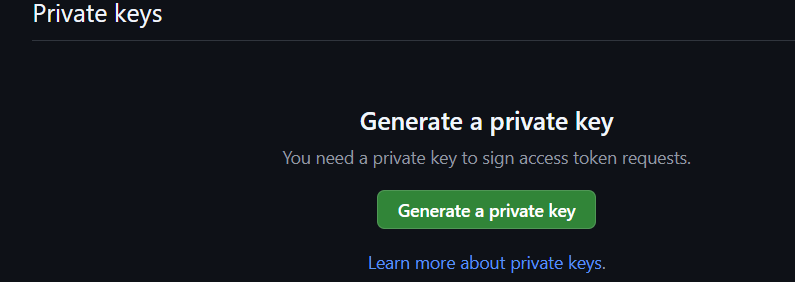
Once the keys are generated, download and secure the private key (.pem file). This is used by the ACA platform components to sign JWTs, which they exchange for short lived installation tokens used to authenticate to the GitHub API. Once complete, proceed to install the app.
Following installation, you would be redirected to the next screen. Note the trailing number in the url. This is your installation ID and it’s what the rate limits are counted against. Example below.

If you miss this screen, you can fetch it from Settings -> Applications -> Installed Apps and clicking on the configure button next to your app which would redirect you back to the url.
Once you have the app id, installation ID and private key, proceed to create and configure the ACA job.
ACA Side Configuration
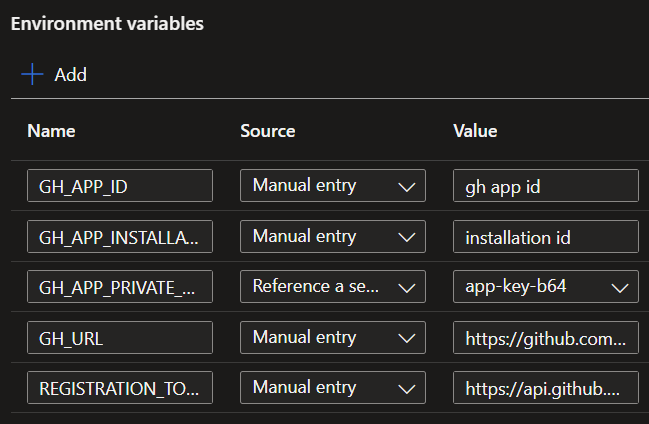
The runner container needs the App ID, Installation ID, and private key. Below are configuration examples from the portal.
ACA container parameters
Keda scaler parameters
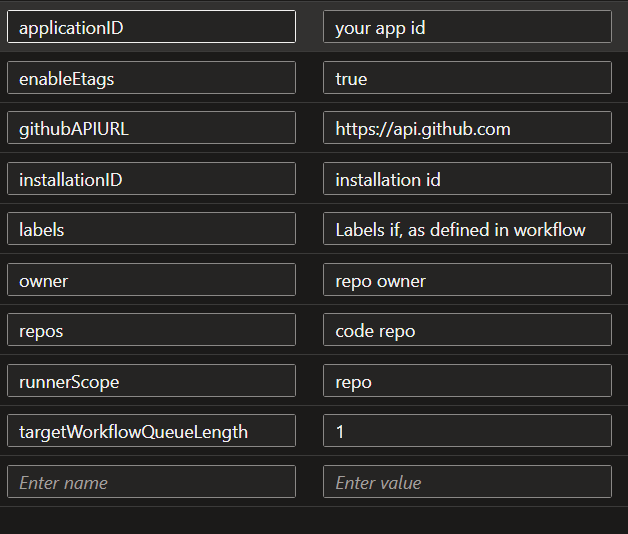
Below is an example with cli.
az containerapp job create \
  --name "youracajob" \
  --resource-group "your-rg" \
  --environment "your-env" \
  --trigger-type Event \
  --replica-timeout 1800 --replica-retry-limit 0 \
  --replica-completion-count 1 --parallelism 1 \
  --min-executions 0 --max-executions 10 --polling-interval 30 \
  --image "youracrregistry.azurecr.io/yourimage:tag" \
  --cpu 1.0 --memory 2Gi \
  --scale-rule-name "github-runner" \
  --scale-rule-type "github-runner" \
  --scale-rule-metadata \
      "githubApiURL=https://api.github.com" \
      "owner=your-org" \
      "runnerScope=repo" \
      "repos=your-repo" \
      "targetWorkflowQueueLength=1" \
      "applicationID=<APP_ID>" \
      "installationID=<INSTALLATION_ID>" \
      "enableEtags=true" \
  --scale-rule-auth "appKey=app-key" \
  --secrets "app-key=$PEM_RAW" "app-key-b64=$PEM_B64" \
  --env-vars \
      "GH_APP_ID=<APP_ID>" \
      "GH_APP_INSTALLATION_ID=<INSTALLATION_ID>" \
      "GH_APP_PRIVATE_KEY_B64=secretref:app-key-b64" \
      "GH_URL=https://github.com/your-org/your-repo" \
      "REGISTRATION_TOKEN_API_URL=https://api.github.com/repos/your-org/your-repo/actions/runners/registration-token"
Note that you would provide a base64 encoded string of the private key. You can generate that as below before adding them as Container App Secrets.
PEM_RAW="$(cat my-app.private-key.pem)"
PEM_B64="$(base64 -w0 my-app.private-key.pem)"
The Entrypoint for App Auth
The authentication mechanism changes in this scenario. A JWT signed with the private key is exchanged for an installation token from the GitHub API, which is then used to fetch a short lived registration token. You can find the full script here.
#!/usr/bin/env bash
set -euo pipefail

: "${GH_APP_ID:?}" ; : "${GH_APP_INSTALLATION_ID:?}"
: "${GH_APP_PRIVATE_KEY_B64:?}" ; : "${GH_URL:?}"
: "${REGISTRATION_TOKEN_API_URL:?}"

GITHUB_API_URL="${GITHUB_API_URL:-https://api.github.com}"
RUNNER_LABELS="${RUNNER_LABELS:-self-hosted,linux}"
RUNNER_NAME="${RUNNER_NAME:-aca-runner-$(hostname)}"

# base64url from stdin. The -A flag keeps output on one line so the JWT is valid.
b64url() { openssl base64 -e -A | tr '+/' '-_' | tr -d '='; }

now="$(date +%s)"
header="$(printf '{"alg":"RS256","typ":"JWT"}' | b64url)"
payload="$(printf '{"iat":%s,"exp":%s,"iss":"%s"}' "$((now-60))" "$((now+540))" "${GH_APP_ID}" | b64url)"

printf '%s' "${GH_APP_PRIVATE_KEY_B64}" | base64 -d > /tmp/app_key.pem
signature="$(printf '%s' "${header}.${payload}" | openssl dgst -sha256 -sign /tmp/app_key.pem -binary | b64url)"
rm -f /tmp/app_key.pem
jwt="${header}.${payload}.${signature}"

install_token="$(curl -fsSL -X POST \
  -H "Authorization: Bearer ${jwt}" -H "Accept: application/vnd.github+json" \
  "${GITHUB_API_URL}/app/installations/${GH_APP_INSTALLATION_ID}/access_tokens" | jq -r '.token')"

registration_token="$(curl -fsSL -X POST \
  -H "Authorization: Bearer ${install_token}" -H "Accept: application/vnd.github+json" \
  "${REGISTRATION_TOKEN_API_URL}" | jq -r '.token')"

./config.sh --url "${GH_URL}" --token "${registration_token}" \
  --name "${RUNNER_NAME}" --labels "${RUNNER_LABELS}" \
  --unattended --ephemeral --replace

exec ./run.sh
ETags
We enabled enableEtags=true in the config above. When it is on, KEDA sends the ETag from the previous GH Api response back as an If-None-Match header. If nothing changed since the last poll, GitHub returns 304 Not Modified, and doesn’t count the request against the rate limit.
With ETags on, only the first poll costs a request. On a mostly idle build repository, which is a very common use case, ETags can drop polling costs by over 90% for a single repo. You can test this locally with a curl script and review the X-RateLimit-Remaining and X-RateLimit-Used headers returned on each API call. An example script can be found here.
GitHub Enterprise App
Setting up and configuring a GitHub Enterprise App is largely the same as a GitHub App scoped to an individual user account. The rate limits however do change with the enterprise app providing limits upto 15000 requests/hour. The app, repository etc would have to live in the Enterprise.
Resources
- Azure Container Apps Jobs overview
- ACA Jobs: Self-Hosted CI/CD Runners Tutorial
- KEDA GitHub Runner Scaler
- KEDA Azure Storage Queue Scaler
- GitHub API Rate Limits
- Authenticating as a GitHub App installation
- Adding self-hosted runners (config.sh and run.sh)
- Official GitHub Actions runner (actions/runner)
- GitHub Webhook Events: workflow_job