Using Webhooks for image pulls with Web App for Containers
This post will cover using “webhooks” to initiate image pulls for Web App for Containers
Overview
A “webhook” in this context is an endpoint exposed on the Kudu/.scm. site for a Web App for Containers resource that offeres another way to restart the site, which will also initiate an image pull, as apart of the site restart operations.
This endpoint is exposed at: https://[username]:[password]@mysite-bxx8bgaxxxxx.scm.eastus-01.azurewebsites.net/api/registry/webhook
[username]is the username for “Basic Auth” credentials that are enabled/disabled in the Configuration blade within the portal- [password]` is the password “Basic Auth” credentials
These credentials are found in Deployment Center under the Application-scope section by default.
Mechanics of the webhook
This is touched on above, but to be more specific, this endpoint offers another way to trigger an image pull.
In most cases, users will update the images tag set for an image used on an application (in this case, Web App for Containers), to something unique - typically incremental over time as updates are done to an applications image, eg:
myacr.azurecr.io/myimage:2025-12-16-v1.0.0.1myacr.azurecr.io/myimage:2025-12-16-v1.0.0.2myacr.azurecr.io/myimage:2025-12-16-v1.0.0.3
Since these are site configuration level updates, and implicitly also will cause a restart - which the “restart” causes the image to be repulled, you’ll have your new image downloaded with all relevant layer changes. This normally fits most use cases. Another scenario that may happen is users pushing changes to the same tag, which is not recommended - in this case, you’d have to manually restart the application for changes to any layers on that same tag to be repulled.
- Note: App Service, like most other PaaS services, do not “watch” or have any awareness that you would have pushed a change to the same tag. A restart is the only way these new changed layers would be repulled with the container runtime.
A webhook, on the other hand, does have “awareness” that an event happened for a specific tag, defined by what action and scope. This webhook is created on Azure Container Registry - it is not created on App Service, only the endpoint exposed to allow restarts for a notification event is exposed by App Service. The only relevancy this has to App Service is the Service URI, in which a “notification” is posted (eg. to restart)
More information on Azure Container Registry Webhooks can be found at Using Azure Container Registry webhooks
Use cases - pushing changes to the same tag
Although not recommended for reasons explained in the overall container community, you can push changes to the same tag - and not have to manually restart (or write some automation/operation to restart the site) when pushing changes to the same tag being used by your Web App for Container.
To be more specific and clear on “pushing changes to the same tag”, this means that you’re just only pushing changes to your Azure Container Registry. You also do not need to have some type of deployment event (like a CI/CD pipeline, or other explicit CLI commands or IaC set up) that would need to handle deployment. This can be seen as another benefit in certain situations.
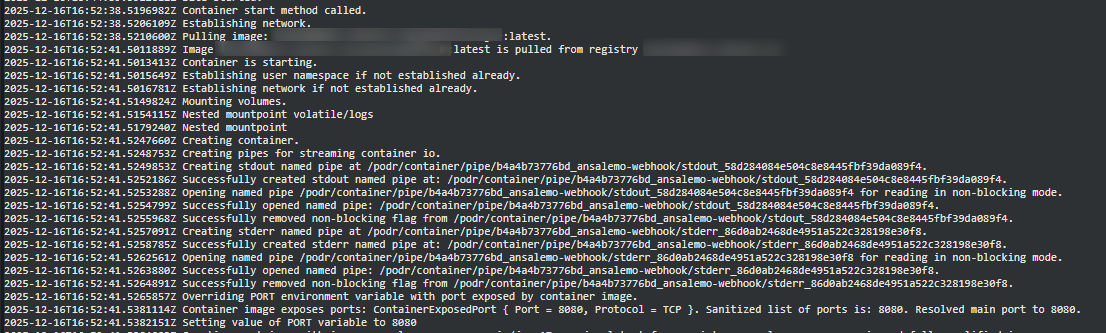
By enabling a webhook (below), and keeping the scope to that same image:tag in use, you’ll see that by reviewing docker.log under /home/LogFiles in App Service Logs (or other areas like Log stream), that the application will be restarted, which will repull image layers, and thus your changes.
- From the time the webhook notification is posted to the App Service webhook endpoint, to the time it takes to start the image pull, may not be immediate
- Meaning, there may be a couple of seconds or so gap, which is expected
Pushing to a webhook
After setting up your webhook, you can use the UI on the Azure Container Registry side to look at webhook events. In this example, we pushed an image with the tag of latest to Azure Container Registry - which fired this webhook.
Click into the webhook to see if any events fired, for example:
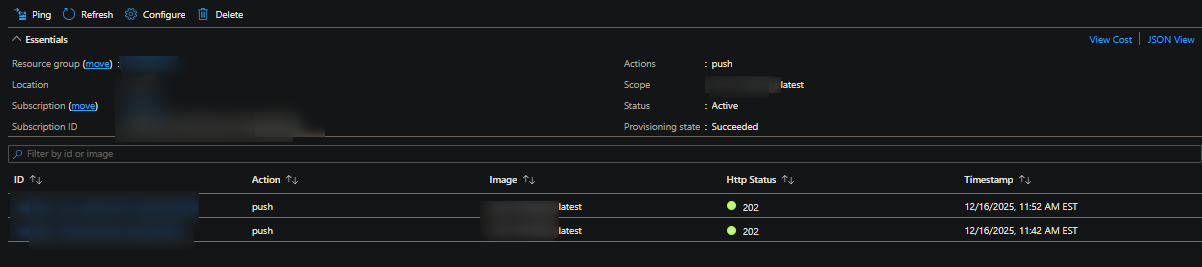
If we look at docker.log (or generally container lifecycle events on this Web App for Container), you’ll see a restart was triggered at the same time:
Note: 11:52AM EST = 16:52 UTC
Creating a webhook
If you want to create a webhook for a registry that is not Azure Container Registry, you need to follow the below option to manually create it on your Azure Container Registry.
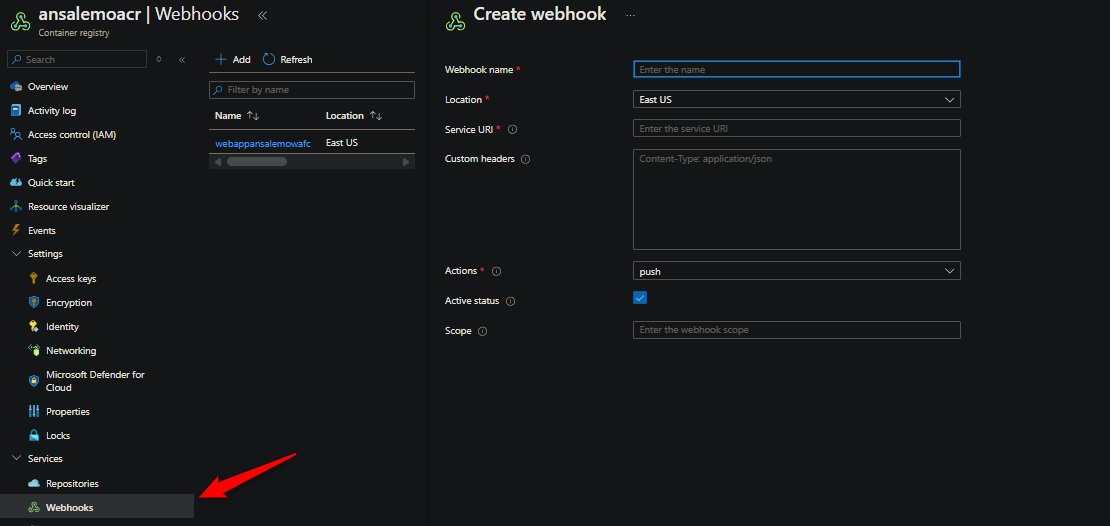
On Azure Container Registry
On your Azure Container Registry, go to Services > Webhooks. Click “Add”. Then fill out the required information.
On App Service
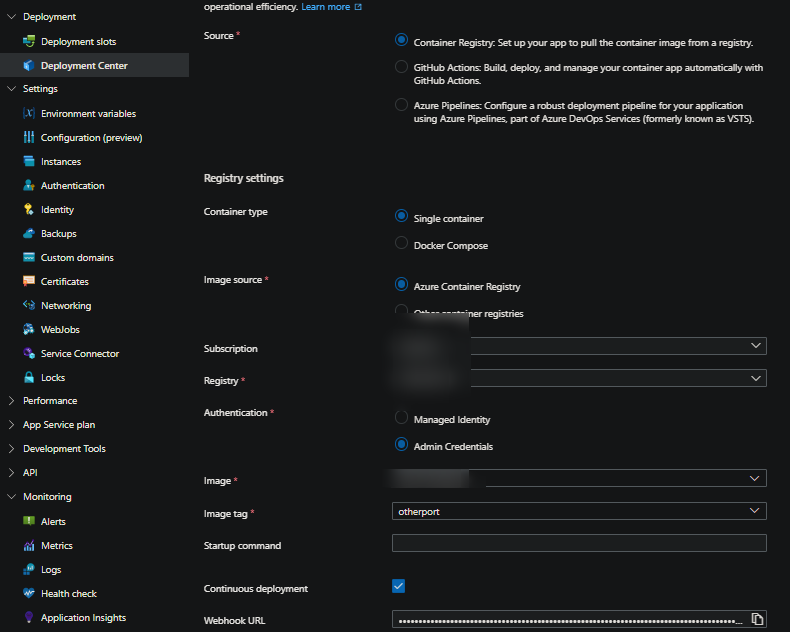
Go to Deployment Center > Check the Continuous deployment box, and click Save. This will create a ready-to-go webhook in your Azure Container Registry under webhooks. This will be created with a scope of your current image:tag set on the Web App for Container.
Other information
pushis the default action, which should be keptscopeis also important, in-line with the above information in this post, keep this to a specificimage:tagyou’ll be pushing changes to.scopeis what the webhook is “watching” changes for. This can be a specific tag, or all tags in a repository.- Note: Doing something like
image:*to watch any tags under an image repository won’t do anything in App Service’s case since for Web App for Containers, this isn’t going to change the images tag on App Service to one that was updated (or anything similiar to that). Forthat effect, you need to do change the image tag on App Service explicitly.
- Note: Doing something like
Troubleshooting
If you notice no restart is happening, go to Azure Container Registry and look at your webhook events. Typically, a HTTP 4xx or 5xx status would be indicative of an issue. Below are examples of HTTP 401’s
HTTP 401:
- Your username and/or password is incorrect. If manually setting this up on the ACR side, double check your credentials
- As a test, set this up via the App Service side since it’ll automatically fill this information in for you
- You also may have Basic Auth publishing disabled. This must be enabled for webhooks to work.
HTTP 403
- Your site likely has a Private Endpoint or Access Restrictions
- If this is due to Access Restrictions, you will need to whitelist the registry IP
- For Private Endpoints, ensure the registry has access to the subnet App Service is in
HTTP 500
- The kudu container is experiencing an issue. Try scaling (up/down) to land on a new instance and have the kudu container restart
HTTP 503
- The kudu container is likely crashing. If using Bring Your Own Storage - when the volume is failing to mount, this will also bring down the kudu container. Review if this is the case. See How to troubleshooting Bring Your Own Storage (BYOS) issues on App Service Linux
- Otherwise, try scaling (up/down) to land on a new instance and have the kudu container restart
No HTTP response is seen/no notification is posted
- There are times inbound network traffic may block a webhook event, which may not return a HTTP response from Kudu (since its blocked before this)
- Review inbound NSG’s and any networking flows towards App Service to ensure this traffic is allowed